
Benchmark测试性能
Benchmark.js 是一个强大的 JavaScript 基准测试库,用于精确测量代码性能。本文将详细介绍其使用方法,包含完整示例代码。
安装方法
使用 npm 安装
bash
npm install benchmark --save浏览器直接引入
html
<script src="https://cdn.jsdelivr.net/npm/lodash@4.17.21/lodash.min.js"></script>
<script src="https://cdn.jsdelivr.net/npm/benchmark@2.1.4/benchmark.min.js"></script>
基础用法
javascript
const Benchmark = require('benchmark');
const suite = new Benchmark.Suite();

// 添加测试用例
suite
    .add('RegExp#test', () => {
        /o/.test('Hello World!');
    })
    .add('String#indexOf', () => {
        'Hello World!'.indexOf('o') > -1;
    })
    .add('String#includes', () => {
        'Hello World!'.includes('o');
    })
    // 添加事件监听器
    .on('cycle', (event) => {
        console.log(String(event.target));
    })
    .on('complete', function () {
        console.log('最快的方法是: ' + this.filter('fastest').map('name'));
    })
    // 运行测试
    .run({ async: true });
关键概念
1. Suite(测试套件)
测试用例的容器,用于组织和管理多个基准测试
2. Test(测试用例)
单个需要测试的代码片段
3. 重要事件:
cycle: 每个测试完成时触发complete: 所有测试完成后触发start: 测试套件开始时触发error: 测试出错时触发
高级配置
测试用例配置选项
javascript
suite.add('Custom test', {
    fn: function () {
        /* 测试代码 */
    },
    minSamples: 50, // 最小样本数
    maxTime: 5, // 最大运行时间(秒)
    delay: 0.1, // 测试之间的延迟
    initCount: 5, // 初始预热次数
    name: '自定义测试', // 测试名称
    onStart: function () {
        /* 测试开始时 */
    },
    onCycle: function () {
        /* 每次循环后 */
    },
    onComplete: function () {
        /* 测试完成后 */
    },
    onError: function () {
        /* 出错时 */
    }
});
异步测试
javascript
suite.add('Async test', {
    defer: true,
    fn: function (deferred) {
        setTimeout(function () {
            // 异步操作
            deferred.resolve();
        }, 50);
    }
});
测试结果解析
测试结果包含的关键指标:
text
String#indexOf x 62,405,689 ops/sec ±1.21% (92 runs sampled)- ops/sec: 每秒操作次数(越高越好)
- ±1.21%: 误差范围(越小越稳定)
- (92 runs sampled): 采样次数
最佳实践
- 避免死码消除:确保测试代码有实际输出
javascript
// 错误方式(会被优化掉)
let sum = 0;
for (let i = 0; i < array.length; i++) {}

// 正确方式
let sum = 0;
for (let i = 0; i < array.length; i++) {
    sum += array[i];
}
return sum;- 使用Setup/Teardown:准备测试环境
javascript
suite.add('Array#forEach', {
    setup: function () {
        this.array = Array(1000)
            .fill()
            .map((_, i) => i);
    },
    fn: function () {
        let sum = 0;
        this.array.forEach((n) => (sum += n));
        return sum;
    }
});- 控制测试环境:
javascript
// 在Node.js中禁用优化
function noop() {}
const testFn = Benchmark.prototype._createTest(test);
testFn();
noop(testFn);
完整示例
html
<!DOCTYPE html>
<html>
    <head>
        <title>Benchmark.js 示例</title>
        <script src="https://cdn.jsdelivr.net/npm/lodash@4.17.21/lodash.min.js"></script>
        <script src="https://cdn.jsdelivr.net/npm/benchmark@2.1.4/benchmark.min.js"></script>
        <style>
            body {
                font-family: Arial, sans-serif;
                max-width: 800px;
                margin: 0 auto;
                padding: 20px;
            }
            .results {
                margin-top: 20px;
                padding: 15px;
                background: #f8f9fa;
                border-radius: 5px;
            }
            .test-case {
                margin-bottom: 15px;
                padding: 10px;
                border-left: 4px solid #4285f4;
            }
            .fastest {
                border-left-color: #34a853;
                background-color: #e6f4ea;
            }
            .chart {
                height: 300px;
                margin: 20px 0;
                display: flex;
                align-items: flex-end;
                gap: 10px;
            }
            .bar {
                flex: 1;
                background: #4285f4;
                position: relative;
            }
            .bar-label {
                position: absolute;
                bottom: -25px;
                width: 100%;
                text-align: center;
            }
            .bar-value {
                position: absolute;
                top: -25px;
                width: 100%;
                text-align: center;
                font-weight: bold;
            }
            button {
                padding: 10px 20px;
                background: #4285f4;
                color: white;
                border: none;
                border-radius: 4px;
                cursor: pointer;
            }
            button:hover {
                background: #3367d6;
            }
        </style>
    </head>
    <body>
        <h1>Benchmark.js 性能测试</h1>
        <button id="runTests">运行测试</button>
        <div class="results" id="results"></div>

        <script>
            document.getElementById('runTests').addEventListener('click', runBenchmarks);

            function runBenchmarks() {
                const resultsElement = document.getElementById('results');
                resultsElement.innerHTML = '<p>运行测试中...</p>';

                const suite = new Benchmark.Suite();
                const testData = Array(10000)
                    .fill()
                    .map((_, i) => i);
                let results = [];

                // 添加测试用例
                suite
                    .add('for循环', function () {
                        let sum = 0;
                        for (let i = 0; i < testData.length; i++) {
                            sum += testData[i];
                        }
                        return sum;
                    })
                    .add('for...of循环', function () {
                        let sum = 0;
                        for (const value of testData) {
                            sum += value;
                        }
                        return sum;
                    })
                    .add('Array#reduce', function () {
                        return testData.reduce((sum, val) => sum + val, 0);
                    })
                    .add('Array#forEach', function () {
                        let sum = 0;
                        testData.forEach((val) => (sum += val));
                        return sum;
                    })
                    .add('while循环', function () {
                        let sum = 0;
                        let i = testData.length;
                        while (i--) {
                            sum += testData[i];
                        }
                        return sum;
                    })
                    .on('cycle', (event) => {
                        const result = {
                            name: event.target.name,
                            hz: event.target.hz,
                            stats: event.target.stats
                        };
                        results.push(result);
                        resultsElement.innerHTML += `<div class="test-case">${String(event.target)}</div>`;
                    })
                    .on('complete', function () {
                        const fastest = this.filter('fastest')[0].name;
                        resultsElement.innerHTML += `<div class="test-case fastest">最快的方法是: ${fastest}</div>`;

                        // 渲染柱状图
                        renderBarChart(results, fastest);
                    })
                    .run({ async: true });
            }

            function renderBarChart(results, fastest) {
                const maxOps = Math.max(...results.map((r) => r.hz));
                const chartElement = document.createElement('div');
                chartElement.className = 'chart';

                results.forEach((result) => {
                    const height = (result.hz / maxOps) * 100;
                    const isFastest = result.name === fastest;

                    const bar = document.createElement('div');
                    bar.className = 'bar';
                    bar.style.height = `${height}%`;
                    bar.style.background = isFastest ? '#34a853' : '#4285f4';

                    const value = document.createElement('div');
                    value.className = 'bar-value';
                    value.textContent = (result.hz / 1000000).toFixed(2) + 'M';

                    const label = document.createElement('div');
                    label.className = 'bar-label';
                    label.textContent = result.name;

                    bar.appendChild(value);
                    bar.appendChild(label);
                    chartElement.appendChild(bar);
                });

                document.getElementById('results').appendChild(chartElement);
            }
        </script>
    </body>
</html>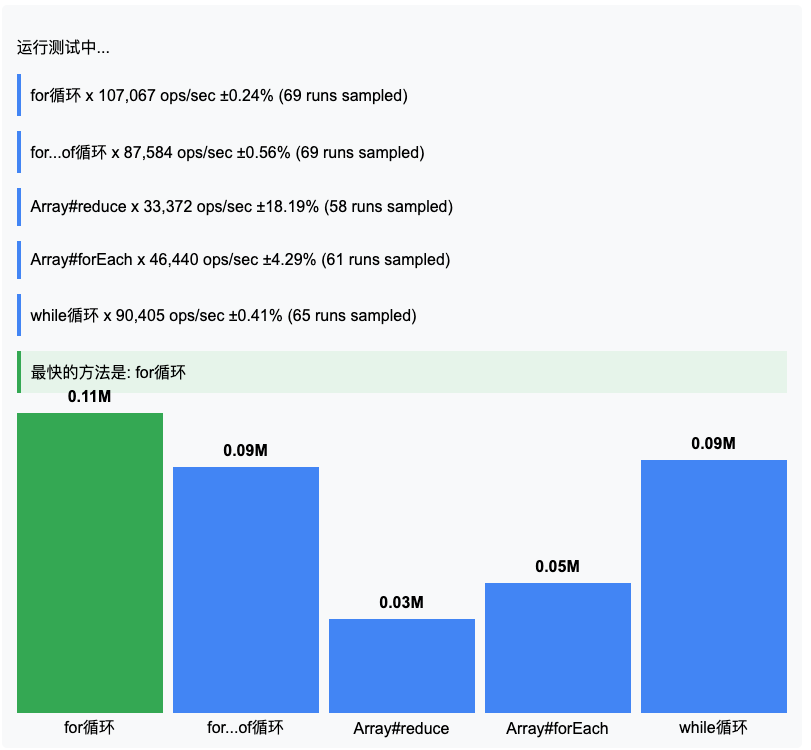
常见问题解决
测试结果波动大:
- 增加
minSamples和maxTime - 关闭后台应用程序
- 禁用浏览器扩展
- 增加
测试函数被优化掉:
- 确保有实际输出
- 使用
this上下文存储结果
javascriptsuite.add('Test', function() { this.result = /* 计算结果 */; });内存问题:
- 在
setup中初始化数据 - 在
teardown中清理资源 - 避免在测试中创建大型对象
- 在
Benchmark.js 提供了专业级的性能测试能力,通过合理配置和遵循最佳实践,您可以获得准确的性能数据来优化代码。